
1. Design
Click LEDs on the board to apply the active color.
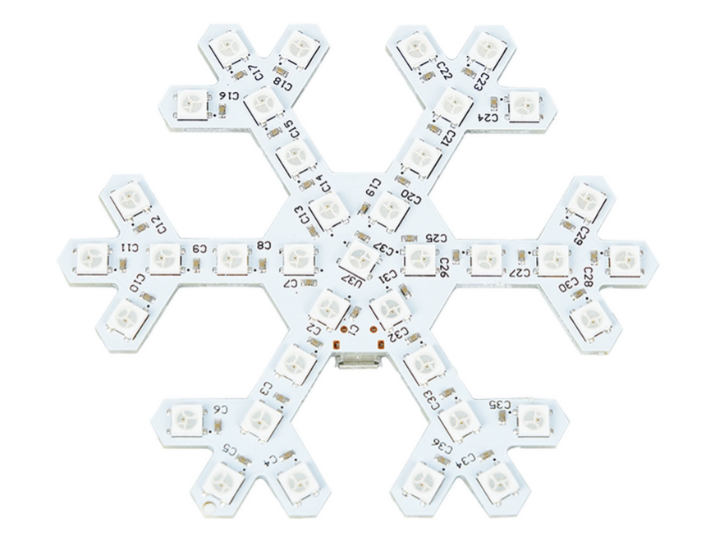
37 × WS2812
Effect templatesClick a template to load it and preview immediately.
Quick groups
No LED selected
Click a pixel to edit it.
2. Sequence
Each step stores the complete visible state and its duration.
Ready
Steps0
Duration0 ms
Animation data estimate0 B
Flash budgetEstimated animation data: 0 B
STC15W204S firmware must fit within 4096 bytes. The browser estimate covers animation tables; the server performs the authoritative compiled-size check.3. Build
Turn the visual sequence into STC15W204S firmware, then load it directly into the browser flasher.
Ready to build.
Build log
Electrical mapping: U1→U36 form the six snowflake arms and U37 is the physical center pixel. Studio treats U37 as WS2812 chain index 36 (the 37th pixel).
Firmware clock: the supplied WS2812 driver is timed for approximately 33 MHz, so Studio-built firmware is flashed with a 33.000 MHz user IRC target.
Firmware clock: the supplied WS2812 driver is timed for approximately 33 MHz, so Studio-built firmware is flashed with a 33.000 MHz user IRC target.
4. Flash Hardware
Uses the tested Chrome/Edge Web Serial path for CH340N → STC15W204S.
Idle
Diagnostics
Studio workflow: Build Firmware HEX loads the generated firmware here automatically. Then connect the CH340, click Flash HEX, and press K1 once when prompted.